facebook pixel

Spring Clean Your Online Life

After a winter of hibernation indoors at our computers (yes, Floridians feel the need to hibernate too), we’re spending more time outside enjoying the beautiful weather. With the sunshine comes perspective, and many of us at Liquid Creative Studio have felt the need to de-clutter our lives. And by our lives, we mean our virtual lives.

If you’re a slave to your computer, why not make it a more pleasant place to be?

Desktop: Trash and refresh

If you have the same desktop background that you had LAST spring, but you can barely see it anymore because of all the files, this tip is for you. Spend 30 minutes today creating folders, organizing the files and deleting the ones you don’t need anymore. Then find an image online that makes you happy (we recommend www.wallpaperswide.com) and change it out every few months.

Email: Clear out the inbox(es)

Thousands (and thousands) of emails have piled in our inboxes this year. Not only is it slowing our server down, it’s making the “search” tool less handy. If being subscribed to too many newsletters and promotions is your problem, use www.unroll.me to unsubscribe from them all at once. When I did it, it took me off almost 60 lists!

Facebook: De-friend unhappiness

Many of us are slaves to Facebook. If you feel the need to check it every day, at least make sure it’s uplifting. Connecting with people and sharing your awesome life online is great, but make sure you’re not being brought down by other people.

We’ll be spending this month clearing out the old to focus on the new, and we hope you do too! Let us know on our Facebook page how it improves your life.

Where did we get this brilliant idea to de-clutter our virtual lives? We were inspired by Bianca Strzelczyk. Check out her blog post here: De-clutter Your (Virtual) Life.


Stay Connected Online This Summer

screen-shot-2014-04-25-at-1-56-15-pm-300x145-1982025

The weather’s getting hotter, the days are getting longer and vacations are being booked, which can only mean one thing. It’s almost summertime! By Florida standards, at least. For smaller businesses, all the excitement and activity of summer is the perfect time to revamp their social media presence.

Social media is one of the best ways for businesses with limited advertising budgets to stay connected with customers. By being part of Twitter, Facebook and other widely used platforms, businesses can keep their publics updated and informed – even when business might be slow.

Keep your accounts updated

Many businesses are on social media but post very irregularly. Make a goal to post an interesting news article, business update or special at least once a day. Include a link or picture with every single post because it’s proven to increase fan engagement. Don’t get discouraged if you have little engagement at first. As your fan count grows, adjust to producing the content they want to read. The Facebook Analytics feature is great for gauging what that content is.

Join a new social media site

Being involved with multiple social media sites is always a plus because it improves your SEO, or search engine optimization, and makes current and potential customers find you more easily online. If you have your Facebook presence on lockdown, consider expanding to Twitter or Pinterest.

Be engaging

We recommend downloading the “Facebook Pages Managers” application on your smart phone so you get notifications when anyone comments on or messages your company page. As your fan count grows and more people interact on your page, you’ll need a fast response time to keep them engaged. And don’t be afraid to ask your fans questions. “How is everyone’s summer going?” shows that you’re interested in two-way communication and gives the opportunity to know fans on a personal level.

We strongly recommend using innovative methods to connect with fans on Facebook. Hosting contests, highlighting employees and tagging them in the posts, and offering specials are a few proven ways to maximize your social media presence.

screen-shot-2014-04-25-at-1-49-58-pm-150x150-8727807
Halley Wharton interns at Liquid Creative Studio while attending the University of Florida for Public Relations.

Why Upworthy is the Fastest Growing Media Site in History, And Rightfully So

The viral-video website, Upworthy, has been the topic of conversation in today’s social media-driven society. So, what is all the buzz about? Upworthy offers anything from inspirational videos to thought-provoking political fares to get you thinking about what really matters in life.

Haven’t heard of it? Well, here’s a little insight to fill you in:

“Things that matter. Pass ‘em on.”

Two sentences. Six words. One successful mission.

The purpose of Upworthy is not to generate traffic to their site, but to generate traffic on social media. Each week, Upworthy browses the Internet for videos highlighting important issues, revamps them, and voilà – a million hits.

Trending just about everywhere

A better question: how haven’t you heard of it? In June, Fast Company reported that almost two years after its June 2012 launch, its up to 22 million monthly viewers. It’s trending on Tumblr, Twitter, and predominantly Facebook.

Its secret is in the “curiosity gap.” The idea is to post a headline long enough to tell the story, but not enough to give it all away. As an example, here’s a video posted recently to market the dangers of speeding:

They thought they were hanging out with friends, but ended up attending their own funeral

It’s good, eh? You can appreciate it even if you don’t speak French.

Upworthy vs. Buzzfeed: Who does it better?

Its largest competitor, by far, is Buzzfeed – the other largescale social news and entertainment website. Buzzfeed’s endless stream of quizzes and clever GIFs can be seen constantly circulating through social media. Although highly entertaining, after the millionth “Which character are you?” quiz, you’ll welcome the counterweight offered by Upworthy.

Food for thought

What’s my point, exactly? Choose to focus on the good, relevant and meaningful. At best, I hope the site will brighten your day. At worst, you’ve gained a few topics of conversation.

Meet the author:
534233_580881818593291_138035246_n-e1398444553371-150x150-7523469
Rachel Luciano interns at Liquid Creative Studio while attending the University of Florida for Business Administration with a concentration in Marketing.

Close More Sales: 5 Best Print Sales Tools

Seal More Deals with Effective Print Sales Tools

In an increasingly digital world, the sales landscape remains more personal, and many interactions still take place face-to-face. When your team is trying to communicate what your organization offers to potential new customers, having the right printed tools is critical to closing the sale. Print sales tools help your team:

  • Convey a consistent message
  • Clearly communicate your offerings
  • Demonstrate the value of your organization

Keep reading for the 5 best print sales tools that will help your sales team seal more deals!

1. Rack Cards

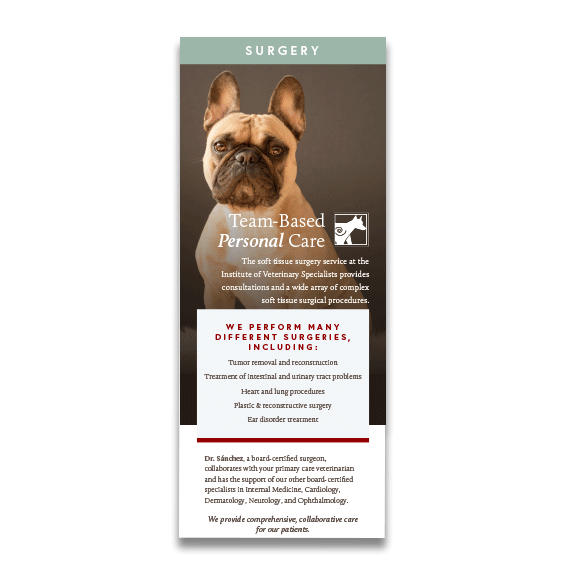
Though simple, rack cards can help you convey your offerings and key messaging when starting the sales process. They’re so easy to hand someone if they ask you what your company does, and are especially convenient at events, such as trade shows.

lcs_salestoolsblog_rackcards-3391985
We created rack cards for the Institute of Veterinary Specialists to convey key information about their services in an easy to read format.

2. Branded Pitch Decks

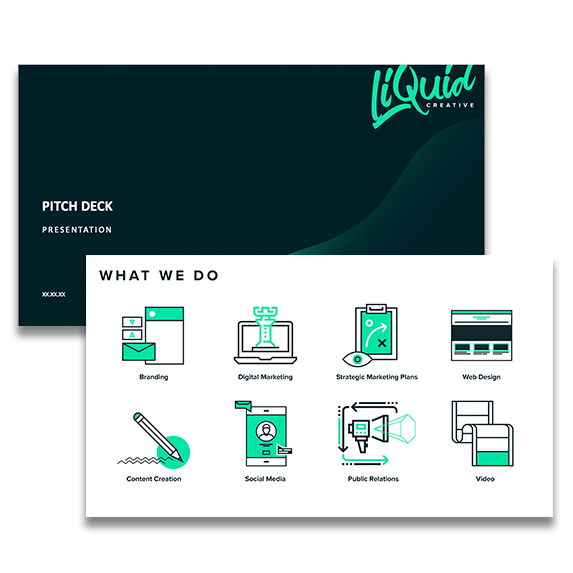
It’s critical that your brand remains prominent and cohesive throughout the sales process. Branded pitch decks not only add personality to your proposal, but also ensure that potential clients can easily tell which one is yours, even when they’re shuffling through several options. Whether you decide to print your pitch deck or send over a digital version, make sure it’s always branded!

lcs_salestoolsblog_pitchdeck-1606414
Our own pitch deck is a great example of how branding elements can really make a presentation stand out. We love our custom icons!

3. Case Studies

If you solve a problem for your customers, you should have case studies that outline exactly how you accomplish their goals and what type of results you can achieve. Case studies draw on real examples of your work to either tell a story or provide data about your past projects. Sharing real life examples of your accomplishments really  builds trust with potential customers, helping you to close the sale. In addition to being a great print sales tool, case studies can also be published to your website and shared on social media. Read the case study that we wrote for Scherer Construction following the successful completion of their St. Anne Early Learning Center.

scherer_casestudygraphic_2019-600x314-5752289
We wrote a case study outlining how Scherer Construction addressed various construction challenges throughout this impressive build.

4. Product Sheets

Product data sheets provide potential customers with specific, detailed information about your products in a visually appealing format. They’re a great tool to make sure that your sales team doesn’t leave anything out when communicating product benefits!

lcs_salestoolsblog_productsheets-1297746
We created this product specification sheet for Carbonxt, an activated carbon manufacturer, to outline important product information in an easy to read layout.

5. Catalogs

A catalog helps your sales team talk through different product options with customers, and is something that the customer can take home to reference later. Catalogs can also help you feature your most profitable products, and generally lead to more natural conversations than clicking through a website with a customer.

lcs_salestoolsblog_catalogs-6684173
We created a catalog of floor plan options for Red Door Homes, a local custom home builder.

Get Eye-Catching Print Sales Tools

Ready to start closing more deals with eye-catching print sales tools? At Liquid Creative, we design unique branded pieces that help you stand out from the competition. Contact us to get more information about how we can help you build an arsenal of effective sales tools!

Liquid Team Resolutions for 2014

The Liquid Team’s New Years Resolutions

Wondering what the Liquid Team came up with as our New Years Resolutions for 2014? Here they are!

Maryanne:  I didn’t really come up with resolutions, but my roommate and I are going to do one exciting thing off a Bucket List we compiled every weekend for the next three months.
5 of them include: bike the 32-mile roundtrip Gainesville-Hawthorne Trail, get a tattoo, take a weeklong road trip to Key Largo and camp on the beach, spend a few hours every month volunteering, and complete one Pinterest project a month.

Amanda: I’m joining my sister and setting a goal to read 30 books this year. Some of the first few on my list include The Goldfinch by Donna Tartt, The Fault in Our Stars by John Green, and Why I Write by my all-time favorite author George Orwell. Have you read any of these? What books should I add?

Bradley:
Build a coffee table
Do not buy another book until I finish the 80 I’ve bought and haven’t gotten to yet
Play my trumpet a little every day
Write two short stories
Volunteer at least twice a month
Go white water rafting again
Do a handstand
Get back into the rock gym and land a 5.9 by June

Nate: Come up with a resolution for next year’s resolution.

Hector: My New Years Resolutions are to spend more time with my family, not to sweat the small stuff, and to find true happiness.

April:
Spend time playing more with my kids
Plant a garden (I love gardening and find it therapeutic)
Read more and take time to read for fun
Visit my grandparents more
Start yoga and work on improving flexibility and lessening stress

Kathryn: As a family we have several, but for me personally: I’d like to read more like I used to … not just the news or previewing my daughters’ books, but for me. I want to fall into a book at night, not just the couch.

Kelli: My goal is to create a five-year plan!

Scott: I am going to start a nonprofit incubator geared toward helping residents of East Gainesville start businesses.

What are YOUR resolutions for 2014?

2013 Resort Vacation Planner

Here at Liquid Creative Studio we like to be creative, think outside the box, and come up with fresh creative concepts that take our client’s brands to the next level! As part of our creative team, we are proud to have some of the most talented and innovative graphic designers in the area! To show you guys how great they are, we will highlight some of their most successful projects for an exclusive, behind-the-scenes outlook on the various works of art produced at our studio.

The first project we’d like to share was designed by graphic specialist, Angela Doughty. Angela did a fabulous job designing the 2013 Vacation Planner for the Resort Vacation Properties of St. George Island, Inc. She created the planner’s layout, cover page, several of the introduction pages and the graphics in the back of the booklet.

To start the project, Angela created three basic layouts for the client to choose from. When she learned that they wanted a simple and clean layout with photos included on the cover, she found the most creative way to integrate those requests and create a suitable theme. The client then selected their favorite design and the rest began to fall into place.

Angela’s strategy was to work from the front of the booklet to the back. The cover set the tone for the rest of the planner, keeping certain graphic elements like the shells consistent. While narrowing which photos to use was one of the most challenging aspects, the process enabled her to choose the perfect color palate to go with the visuals. “I definitely enjoyed working on this piece,” said Angela. “I always love working with great photography and being so inspired by nature, these photos gave me a lot to work with.”

In just a couple of months, the 2013 Vacation Planner was designed and ready for printing! The Resort Vacation Properties of St. George Island was thrilled with Angela’s work and received outstanding responses from its guests. Angela is now working on a new project for the resort. Keep an eye out for what’s next

Favorite Commercials of 2013 Super Bowl

The Baltimore Ravens are officially the Super Bowl winners of 2013. But now the real question is, who took home the trophy for best advertisement of 2013? The Super Bowl is known for its infamous line up of commercials, generating massive amounts of internet chatter throughout the night. Sunday night alone brought in 24.1 million tweets, surpassing the 23 million that took place during the 2013 Presidential election. According to an article posted on CBS News, “39 percent of Super Bowl viewers said the commercials were the best part of the game; the game itself came in second with 28 percent liking it the most.”

For 30 seconds of Super Bowl air-time, advertisers pay close to $4 million! Is it worth the money? What does it take to be the best (or worst)? Also, what emotions must be evoked to entertain the millions of viewers across America? Is it humor? Sentiment? Pride? Suspense? Whatever it may be, expectations are high and continue to increase. We want to know who you think prevailed! Who was the Super Bowl Advertisements XLVII winners of 2013? Please share your comments and opinions below.

April’s Favorites:

1. Seth Rogen and Paul Rudd for Samsung

2. Best Buy Asking Amy

Nate’s Favorites:

1. Hyundai Santa Fe – ‘Team’

I think what did it for me was a kid wrestling a Grizzly Bear.

2. TIDE – Joe Montana Stain

I liked how it featured both Super Bowl teams and the most iconic player from the 49ers while still being very product oriented and creative at the same time.

Facebook Launches Timeline for Pages

Facebook has taken it’s new Timeline layout to pages.

Facebook is bringing a significant change to the way businesses are displayed on Facebook by introducing Timeline for pages.  The most obvious change is the layout.  The cover photo will allow businesses to express their brand in a creative manner.  The goal of the change is to give brands their identity, and to emotionally connect with users.  Instead of brands pushing their product to users, Facebook is trying to connect brands and users with tools that will allow more of a connect and open communications with each other.   Rather than the cookie cutter feed-like display you would normally get in a brands page, the cover photo, and the featured posts are among the elements that ve your brand its identity on Facebook.  You can use Timeline to tell the story of your business.  You can note ‘milestones’ on your page.  Examples of milestones would be; the creation of your business, an evolution of your business, product announcements, major announcements, etc.  All will be displayed in wide attractive images.

facebook-pages-milestones-1135155

One interesting addition Timeline is bringing to pages is ‘pinned content’.  Basically how this will work is it will pin a post to the top of your timeline that will act as your ‘post of the week’.  It will remain above the fold over other newer posts until it is unpinned.  This will allow for major postings (whether they be announcements, offers, etc) to remain the featured post.  Brands can direct users to their landing pages and apps within their pinned posts as well.

Facebook is referring to Timeline for pages as a brands ‘Mission Control’.  Administrators of pages will now have the ability to approve posts for users, and it now allows for direct messaging between Facebook users and brands.  At the top of your page, when logged in as an admin, an administrative panel will drop down listing stats, messages, recent likes, click-thru’s, etc.  Administrator permission levels are also being rolled out, giving users the appropriate level of administrative access to the admin panel of a page.

facebook-pages-admin-7128078

Timeline for pages is available now.  It will be a mandatory change for all brand pages on March 30th.

Liquid Creative converted to the new Timeline this morning.  We would love to share it with you, and encourage you to Like our page for future updates and to see how we utilize the new Timeline layout.

http://www.facebook.com/LiquidCreative


I’m Only Watching for the Commercials: An Advertiser’s Take on the Super Bowl 2012

Growing up in a home with all brothers and a dad who loves football, Super Bowl Sunday always meant to me a celebration of the final day of football!! And let’s not forget, the ability to finally have a vote for what we watch on the living room TV.  It was at an early age of around 10 when I realized I was, “only watching for the commercials.”  I began to love the ads and studied them, choosing my favorite brands and determining which ones did a better job from year to year.  To my own surprise, I found myself looking forward to Super Bowl Sunday’s advertising every year!

This year was another fun evening of advertising, hearing the family laugh, seeing my 88 year old grandmother’s jaw-drop, and witnessing my dad’s smile when he related to one of his favorites, Clint Eastwood and the message about hardworking Americans.  Analyzing their reactions and comments left me wondering, did the advertising resonate and did the ads reach their target markets?  I know my brothers and the 5 other men in the room wanted to buy flowers, computer hosting services and possibly a KIA by the end of the game.  I know every woman in the room, including my grandmother were talking about Beckham well after the spot ended and then were “shushed” because the game had come back on. Continue reading

Integrating Social Media and Your Website

We might as well accept it, social media is taking over the web.  As of December 2011, 64% of all internet users in the US are on Facebook, which boils down to 50% of the US population as a whole.  It’s a powerful thing, and is changing the way we use the internet.  While Facebook is by far the most popular social media platform, its still just one among dozens of others.  If used wisely, social media can be an invaluable tool when partnered with your website to expand your web presence.  Best of all, its free!

Small businesses can be one of the largest benefactors of social media.  Social media is free to setup, and instantly gives businesses the ability to provide real time news and updates through their social media followers.  We will elaborate on how to utilize social media more in future posts, I am going to focus briefly on how social media can be utilized on your website.  When a small business has their site up and running, one goal for the business should be to attract visitors to their social media pages.  If you can get someone to ‘Like’ your page, you instantly have direct real-time communication with that person (and often the people in their network).  We want to encourage visitors to connect with your business on social media.  Having a facebook feed in your website is an option, or simply putting Facebook share icons, or ‘like’ buttons in your website’s posts can get your content on social media without people needing to ‘like’ your business.  Any way to get people to share your website content, or mention of your business on social media is beneficial.  Think of social media as a pond or a spider web.  Getting your content shared on facebook can cause a ripple effect  carrying your content to each visitors unique social spider web.  It’s only one click from the visitor.  Getting interesting content on your site, and making the social media sharing options visible (and not intrusive) should be a goal. Continue reading